MOMENTUM 5 Wireless combines Sennheiser’s signature high-fidelity
sound with an HD-600-inspired driver, delivering detailed and natural
audio.
It also features our strongest adaptive noise cancellation yet, industry-leading
battery life, and versatile features for music, travel, work, and
gaming, all in one headphone.
What are the key features of the MOMENTUM 5 Wireless?
Key features include a 42 mm high-fidelity driver, advanced hybrid
adaptive ANC with 8 microphones, up to 57 hours of battery life,
Bluetooth 5.4* connectivity,
Dolby Atmos spatial audio with head tracking, Lossless codec support,
clear call performance, and Transparency Mode. *Later firmware upgrade
will enable BT 6.0
What type of transducer does the MOMENTUM 5 Wireless feature?
It uses our in-house built 42 mm dynamic driver inspired by the HD
600 series, designed to deliver precise, detailed, and balanced sound.
I work, commute, and travel a lot. Is the MOMENTUM 5 Wireless an excellent choice for on the go?
Yes. With our most powerful noise cancellation, industry-leading
battery life, exceptional comfort that’s due to long-lasting quality
materials and support for music, calls, and gaming, MOMENTUM 5 Wireless
is designed to be a reliable companion for commuting, travel, and
everyday use.
Does the MOMENTUM 5 Wireless feature the latest Bluetooth technology?
Yes, it supports Bluetooth 5.4 for fast, stable connections.
Which Bluetooth codecs are supported by the MOMENTUM 5 Wireless?
It supports SBC, AAC, aptX, aptX Adaptive, and aptX Lossless for
high-quality wireless audio.
Is the MOMENTUM 5 Wireless waterproof or sweat-resistant?
No, MOMENTUM 5 Wireless is not meant for use in scenarios where they
might be exposed to water or excessive sweat.
Are the batteries replaceable? What side is the battery located on?
Yes, the battery is replaceable and can be easily exchanged by the
user. You only need a Phillips head screwdriver and the new battery.
The battery is located within the left earcup, and an instruction
manual is provided to ensure the batteries are exchanged safely.
How do I initially pair the MOMENTUM 5 Wireless with my device via Bluetooth®?
When starting the MOMENTUM 5 Wireless for the first time (which you
can do by pressing the button once), the headphone automatically
goes into pairing mode.
Simply open the Bluetooth menu on your device and search for new
devices. The MOMENTUM 5 Wireless should show up automatically.
Can I connect to more than one Bluetooth device simultaneously (Bluetooth Multipoint)?
Yes, MOMENTUM 5 Wireless supports multipoint with 2 devices by default.
To pair a second device, enable pairing mode on your headphones by
pressing and holding the power button for 5 seconds until you hear
an audio prompt.
How many devices can be paired and stored?
The MOMENTUM 5 Wireless supports pairing with up to 2 devices while
Multipoint is enabled.
Is the MOMENTUM 5 Wireless supported by the Sennheiser Smart Control Plus App?
Yes, you can use the Smart Control Plus app on iOS or Android to
get access to the full suite of features offered by the MOMENTUM
5 Wireless.
Can MOMENTUM 5 Wireless be used with BTD 700 Bluetooth® adapter?
Yes. Using the BTD 700 will guarantee you get the most out of your
MOMENTUM 5 Wireless by enabling aptX which your phone or other source
device may not inherently support.
How do I use the BTD 700 Bluetooth® adapter for the best sound quality?
You can pair the MOMENTUM 5 Wireless with your BTD 700 by putting
both on pairing mode. The two devices should pair automatically.
Can MOMENTUM 5 Wireless be used wired? (analog)
The MOMENTUM 5 Wireless can be used wired with the included USB-C
to C or the 2.5 mm to 3.5 mm AUX cable. The MOMENTUM 5 needs to be
powered on to use the analog connection (cannot be used passively).
How do I connect the MOMENTUM 5 Wireless via USB-C for wired listening?
Simply connect the MOMENTUM 5 Wireless with the USB C cable to the
source device.
What sample rates and bit depths are supported over USB-C?
USB-C mode supports up to 24-bit, 96kHz audio when using audio playback
only. The players USB-C output resolution may need to be changed
to support this format.
If the source is configured to use the headset microphone, this format
and resolution may not be available.
Can the MOMENTUM 5 Wireless be used with a 3.5 mm analog cable?
Yes, but the AUX port on MOMENTUM 5 Wireless is 2.5mm so you would
need an appropriate cable to go with it (provided in the package).
The MOMENTUM 5 Wireless needs to be powered on to use the analog
cable.
MOMENTUM 5 Wireless offers up to 57 hours of playback with active
noise cancellation enabled, making it suitable for extended use such
as travel or long workdays.
How do I charge the headphones?
Please use the USB C-C cable provided with your headphones to charge
your MOMENTUM 5 Wireless.
How long does a full charge take?
Full charge for the MOMENTUM 5 Wireless can be achieved in approximately
2 hours assuming charging from empty
Does MOMENTUM 5 Wireless support fast charging?
Yes, MOMENTUM 5 Wireless supports fast charging with 10 mins of charge
providing approx. 10 hours of playtime with ANC on.
This is different from Qualcomm Quick Charge, which is not supported.
Has the transducer been updated compared to MOMENTUM 4 Wireless?
Hardware-wise, there is no change to the drivers used in the MOMENTUM
4 Wireless
Is MOMENTUM 5 Wireless tuned to the Harman target?
The MOMENTUM 5 Wireless is not strictly tuned to the Harman target
out of the box, though it shares some similarities in the mids and
treble.
What is the frequency response range?
USB & Bluetooth: 6 Hz to 40kHz, Analog Line-In: 6 Hz to 22 kHz
Does MOMENTUM 5 Wireless support Lossless Audio?
Yes, the MOMENTUM 5 Wireless supports wireless lossless audio through
the use of aptX Lossless.
Does MOMENTUM 5 Wireless support Spatial Audio?
The MOMENTUM 5 Wireless supports Dolby Atmos for immersive spatial
audio.
How does spatial audio improve movies, gaming, and music playback
Spatial audio allows for an extremely immersive experience by simulating
audio in a room, rather than from headphones. With the smart control
app, you can also customise the experience
What is Sound Personalization and how does it work?
Sound Personalization is a feature that customises the audio for
individual users based on their preferences
Does MOMENTUM 5 support EQ?
MOMENTUM 5 supports an 8 band EQ for fine control of your listening
experience. This is different than Sound personalization, which
is a guided EQ setup, and they cannot be used at the same time.
How does Sound Personalization differ from EQ?
While the result is the same (audio customised to your preferences),
these two differ in how you get there.
Sound personalization uses a set of questions based on commonly heard
instruments in music, whereas the EQ relies more on the users’ understanding
of which frequencies they want to hear louder or softer
Is sound processing always active, even in wired mode?
Sound processing is active when the headphones are on (active mode),
which is required for analog playback.
EQ and Sound Personalization are only active wen connected by USB/Bluetooth
however.
For low-latency performance for gaming, the source device must support
aptX Adaptive. Gamers can also use wired connections to enable low-latency
audio.
MOMENTUM 5 Wireless possesses our strongest hybrid adaptive noise
cancellation yet. It is up to 3 times stronger at cancelling noise
in mid-range frequencies versus the previous generation.
This is achieved thanks to 8 dedicated microphones strategically
placed to suppress noise, plus the design itself provides passive
noise cancellation by isolating the ear around the comfortable earpads.
Is the ANC adaptive or fixed?
MOMENTUM 5 Wireless is equipped with adaptive ANC, but it can also
be customised to fit user preferences.
How many microphones are used for ANC? Are the microphones physically different than the MOMENTUM 4’s microphones?
MOMENTUM 5 Wireless uses 8 mics (4 per earcup) for ANC. Compared
to the MOMENTUM 4 which has analogue mics, these are all digital.
Can ANC be completely turned off?
Yes, via the Smart Control App
Is wind noise reduction supported?
Yes
Does ANC affect sound quality?
While strong ANC can sometimes overwhelm audible sound in certain
frequencies, the MOMENTUM 5 Wireless has been designed to have no
compromise on the sound quality, regardless of ANC
How does MOMENTUM 5 Wireless perform in windy environments?
The Anti-wind mode feature on the MOMENTUM 5 Wireless is designed
to counter wind noise for minimal effect of wind while listening
to music or during calls
MOMENTUM 5 Wireless uses a total of 4 microphones for calls, 3 feed-forward
mics and 1 feedback mic.
Has call quality been improved over MOMENTUM 4?
Yes, MOMENTUM 5 Wireless call quality has been improved with the
addition of a feedback mic which filters out noise more effectively
compared to the MOMENTUM 4
Is the microphone suitable for professional calls?
Yes, MOMENTUM 5 Wireless features voice pick-up technology to help
isolate your voice during calls and a reliable connection, making
it perfect for professional calls in crowded offices or at home.
Has the weight changed compared to MOMENTUM 4 Wireless?
The MOMENTUM 5 Wireless weighs about the same as the MOMENTUM 4 Wireless
Has clamping force been adjusted?
No
Are the earcups deeper or larger?
No, the earcup sizes and dimensions have been kept the same to maintain
the same comfort level users of the MOMENTUM 4 Wireless have known
and loved
Is MOMENTUM 5 Wireless foldable?
No, they are not foldable, but the overall footprint of the case
has been drastically reduced by 18%, making the MOMENTUM 5 Wireless
a lot more portable than the previous generation
Is it comfortable for long listening sessions?
Yes, MOMENTUM 5 Wireless was designed for long listening sessions
with soft, yet durable materials that are lightweight to reduce fatigue.
The soft materials in the earpads work as cushions that passively
isolate sound, while the silicone on the headband softly secures
the product in place.
The design of the MOMENTUM 5 carry bag is quite different from that of the MOMENTUM 4. Is there any design rationale behind this?
The main rationale was to increase portability and reduce the size
footprint of the case, both for the benefit of those who travel frequently
with their headphones, and for lower environmental impact
Any current updates on MOMENTUM 5 packaging and unboxing experience?
We streamlined the unboxing experience and improved the quality of
the packaging as well as the documentation included in the box.
Our new transparent wood fibre sealing stickers allow tool-free access
to the contents and a more premium first impression. Each content
included now has a specified and secure slot, and we upped the explanation
on the headphone itself to improve the first-time usage of the product.
What control methods are available (touch, buttons)?
The MOMENTUM 5 Wireless sticks with the established control scheme
of the MOMENTUM 4 Wireless.
All commands relevant to powering on or pairing the headphones are
located on the button, whereas all commands related to music, ANC
or calls are located on the touchpad.
Does MOMENTUM 5 support gesture controls?
Yes, the MOMENTUM 5 Wireless supports the established control scheme
of the MOMENTUM 4 Wireless.
This includes the gesture control scheme to control your music or
calls via sliding to the front, back, up, or down or simply tapping.
Additionally, to the MOMENTUM 4 Wireless controls we also added the
possibility to trigger Dolby Atmos via a gesture control. Simply
double tap on the touchpad with two fingers simultaneously to activate
or deactivate Dolby Atmos.
Does it support auto-pause when removed?
Yes, the MOMENTUM 5 Wireless pauses music when the headphone is removed
from the head completely and starts music playback again when at
least one side of the headphone is worn again.
Does it automatically power off when not in use?
Yes, the MOMENTUM 5 Wireless automatically powers off after 15 minutes
of not using it. However, due to the feedback we got from users of
the MOMENTUM 4 Wireless, the headphone does not turn on automatically
again.
You need to turn it on manually by a simple single short click on
the button to listen to music again.
Is wear detection supported?
Yes, the MOMENTUM 5 Wireless has wear detection integrated. The headphones
pause music automatically when you remove it from your head and continue
again once you put the headphones back on again.
Additionally, the headphones also accept calls automatically when
it gets put on the head and you have an incoming call.
Does it support auto-off when put into the case?
Yes, the headphones turn off automatically when they are put into
the case and the lid of the case is closed. However, to increase
the ease of use and improve connectivity, the headphones stay off
when you remove them from the case. To turn them on, you always need
to manually click the button.
Yes, MOMENTUM 5 Wireless is supported by Smart Control Plus to allow
for access to its extensive customisation options
What features are available in the app?
Sound adjustments with Hi-res or AptX, ANC and transparency mode
adjustments, EQ, Sound Personalization, Connection management, and
Dolby are the highlights
Can firmware be updated via the app?
Yes, when a new FW is available for your MOMENTUM 5 Wireless, the
app will prompt you for an update
Is Sound Personalization done in the app?
Yes
Can ANC and Transparency be adjusted in the app?
Yes
Is multipoint management available in the app?
Yes
How does hardware–software co-design improve performance?
The app and hardware of the MOMENTUM 5 are designed to work hand
in hand for users to get the most out of their headphones while still
allowing for use out of the box
Yes, MOMENTUM 5 Wireless offers a 1-year warranty in line with
industry
standards.
What spare parts are available?
Earpads and battery
Are earpads replaceable?
Yes
How to replace the spare parts?
The earpads can be pulled off with some force. Replacement earpads
can simply be snapped back in. To replace the battery please
follow
the instructions provided in the quick guide.
Where to get the spare parts?
All available spare parts for the MOMENTUM 5 will be listed on
our
website www.sennheiser-hearing.com
How easy/difficult is it to exchange the battery?
We made sure that the process to exchange the battery is as easy
as possible without compromising on the overall quality of the
sound
or the headphone in general.
We managed to do so really well. You can exchange the battery
easily
by removing the earpad, unscrewing four screws, removing the
baffle,
and then unplugging the old battery and plugging the new battery
in.
How can you exchange the battery?
To extend the service life of the product, the headphones have
a
rechargeable battery that can be replaced.
The compatible Sennheiser battery is BA 500. It will be available
in the EU and further selected countries.
ATTENTION.
Replacing with a non-compatible battery can defeat safeguard!.
The use of non-compatible rechargeable third-party batteries can lead to a limited operating time of the headphones or damage to the
product..
▷ Only use rechargeable spare batteries supplied or recommended by Sonova Consumer Hearing. We recommend to use original Sennheiser batteries..
▷ If you consider to use batteries from third-party providers, you need to ensure that the batteries comply with all technical specifications as shown in the chapter and are approved to local regulation(s).
Charging blocks that support both 5V and 9V+ output should not be used, as over voltage chargers can damage your product.
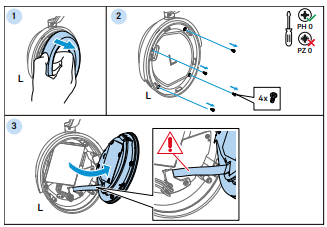
Remove the ear pad from the left ear cup to protect it
from damage
(see page 37 of the instruction manual).
Remove the four Philips head screws from the left ear
cup with
the screwdriver.
Attention! Risk of damage to the speaker cable. Do not
pull the
acoustic unit off too far and move it carefully.Open
the
left ear
cup by pulling the acoustic unit upwards.
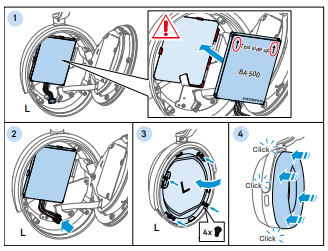
Disconnect the battery cable plug from the main circuit
board.
Remove the rechargeable battery from the battery holder.
Inserting the new rechargeable battery
Place the rechargeable battery into the holder:– Ensure
that the
battery is correctly aligned. The printed arrows must
point
upwards,
towards the headband. Carefully snap the battery into
the
edges of
the holder.
Connect the battery cable plug to the main circuit board.
Close the ear cup by putting on the acoustic unit. Attach
the
acoustic unit by tightening the four Philips head screws.
Reattach the ear pad back onto the ear cup (see page
37
of the
instruction manual).
What do I need to look out for when exchanging the battery?
The most important thing is to be careful when exchanging the
battery
itself, as you open a part of the headphone where things can
break
more easily than on the outside.
We did make sure to improve the quality also of the internal
components
as much as possible, but this is still a vulnerable part.
To make sure you have the same audio quality as before, make
sure
the baffle sits correctly within the earcup and that there are
no
visible gaps between the earpad and the earcup.
There are a couple of tricks we noticed during the development
that
make exchanging the battery easier. One thing is to “reverse”
the
headphone and put the left earcup onto the right side.
This makes handling the baffle easier, because you can simply
put
the baffle onto the right side of the earcup and not worry about
it falling off or getting in the way.
Once you put in the new battery, it mostly also makes sense to
bend
the cables of the battery towards the bottom of the earcup as
much
as possible, so that the baffle can be put on top without much
effort.